Your facilitation script.
Right where you need it.

The Workshopr.io Sidekick puts your workshop agenda, facilitator scripts, timers, and intervention cards in a Chrome side panel — so you can facilitate without switching tabs.

Add to Chrome — Free

Works with Google Meet, Zoom, Teams, or any browser-based meeting.

Tab-switching kills facilitation flow

You built a great workshop agenda. You rehearsed the timing. Then the session starts and you're fumbling between your agenda doc, the video call, the shared whiteboard, and your facilitator notes. Every tab switch breaks your eye contact. Every “hold on, let me find that” erodes the room's trust.

Three steps to smoother sessions

1

Plan your workshop

Build your agenda in the Workshopr Planner. Add exercises, set durations, write your facilitator script for each activity.

2

Open the panel

Click the Workshopr icon in Chrome. Your saved workshop loads into a sleek side panel that sits alongside any tab.

3

Facilitate with confidence

Follow your script, track time, and pull up intervention cards — all without ever leaving your video call.

Everything you need, nothing you don't

timer

Dual-Layer Timer

Never lose track of time again. A session-wide countdown runs alongside per-activity timers, so you always know where you stand — and what's coming next.

description

Facilitator Scripts

Know exactly what to say and do. Each activity carries a detailed script — talking points, instructions, debrief questions — visible only to you.

emergency

Intervention Cards

Handle the hard moments. When energy drops or conflict rises, pull up a situation-specific card with proven facilitation moves.

view_agenda

Full Agenda View

See the whole picture at a glance. Your complete workshop timeline with durations, activity types, and progress indicators.

swipe

One-Click Navigation

Move through your agenda without friction. Tap to advance, jump to any section, or go back — the panel follows your flow.

folder_open

Your Workshops, Instantly

Load any saved workshop in two taps. Your Workshopr library syncs to the extension — yesterday's prep is today's session.

A side panel, not another tab

Chrome side panels stay pinned beside your active tab. Your facilitation tools live right next to your video call — no switching, no alt-tabbing, no losing your place.

  • checkStays visible alongside Google Meet, Zoom, or any browser tool
  • checkDoesn't cover your participants' video feeds
  • checkNo extra window management — it's built into Chrome
  • checkWorks on any page, not just meeting apps
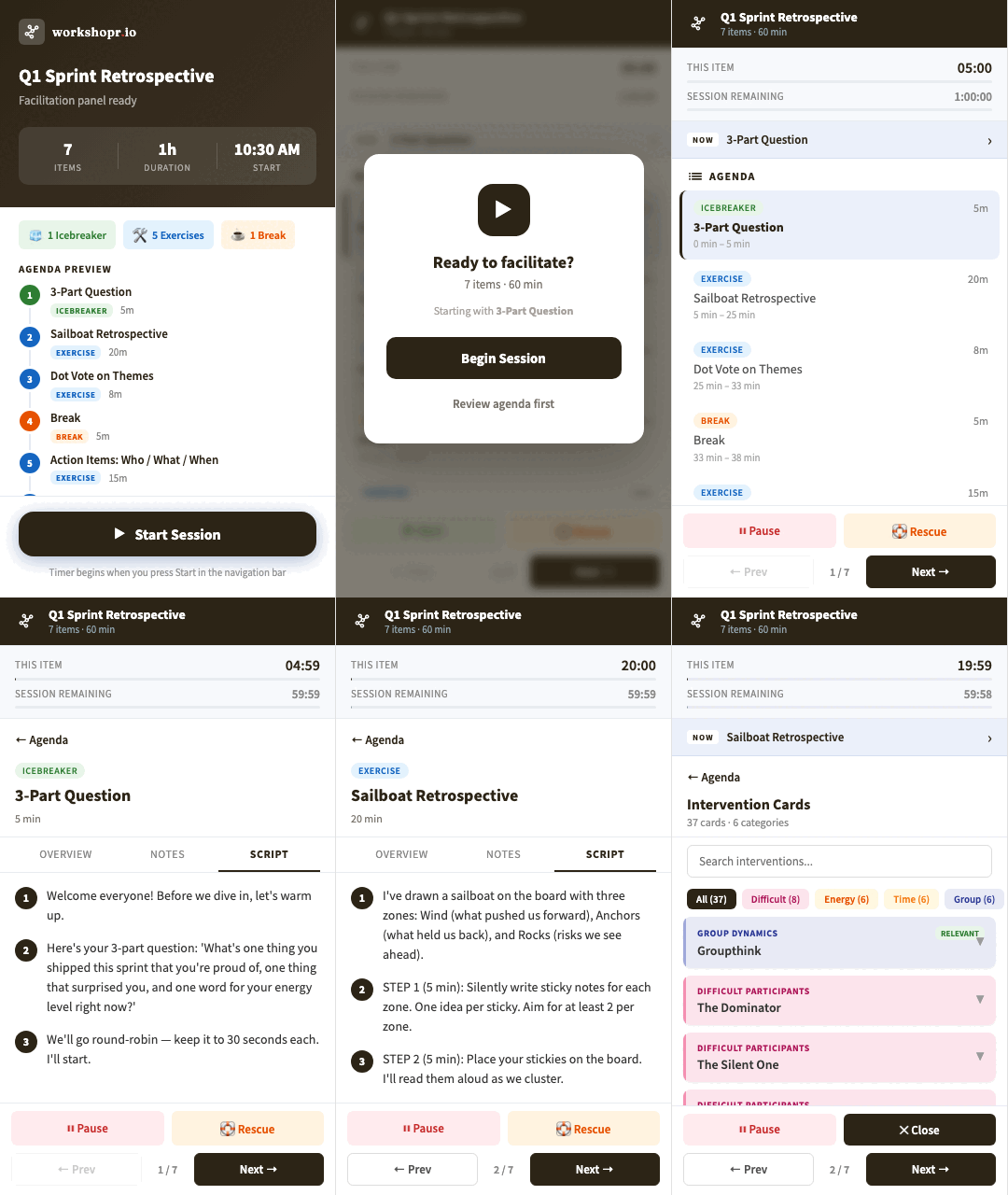
Animated demo of Workshopr.io Sidekick showing intro, agenda, script view, and intervention cards

Built for people who run sessions

hub

Facilitators

Lead design sprints, strategy workshops, and ideation sessions with a script at your side.

school

Trainers

Deliver engaging learning experiences without losing your place in the curriculum.

sprint

Scrum Masters

Run retros, planning sessions, and stand-ups with better time management and structure.

groups

Meeting Runners

Turn any recurring meeting into a structured, outcome-driven session.

Stop facilitating from memory.

Your preparation deserves to be visible during the session. The Sidekick keeps your entire workshop — agenda, scripts, timers, interventions — one glance away.

Add to Chrome — Free

Common questions

Yes. The Sidekick is a Chrome side panel, which means it works alongside any website — including Google Meet, Zoom (web client), Microsoft Teams (web client), Miro, MURAL, or any other browser-based tool. If it opens in Chrome, the panel works beside it. Native add-ons for Google Meet, Zoom, and Microsoft Teams are coming soon.
You'll need a free Workshopr account to save workshops and sync them to the extension. Creating an account takes less than a minute, and the Planner is free to use.
The Sidekick is designed to work with workshops created in the Workshopr Planner. The Planner is where you build your agenda, write scripts, and set durations — the Sidekick then presents all of that during your session.
Absolutely. In the Workshopr Planner, you can add custom activities with your own titles, durations, and detailed facilitator scripts. Everything you write there appears in the Sidekick during your session.
Yes. The Workshopr.io Sidekick Chrome extension is free. You get full access to the side panel, timers, scripts, and intervention cards with your free Workshopr account.
Your workshop data is stored on Workshopr's servers and transmitted over HTTPS. The extension fetches your workshop when you open it and does not share data with third parties. Your facilitator scripts and session plans remain private to your account.